Testing in EK9
Tests verify your code works correctly. When you change code later, running tests confirms you haven't broken existing functionality.
Quality Enforcement Applies to Tests: EK9 enforces the same quality standards on test code as production code. Test functions must have complexity < 11, descriptive variable names (no temp, flag, data), and meet cohesion/coupling limits. See Compile-Time Validation and Code Quality.
- Overview - Testing as a language feature
- Your First Test
- Test Types - Assert-Based, Black-Box, Parameterized
- The @Test Directive - Grouping tests
- Assertion Statements - assert, assertThrows, assertDoesNotThrow
- The require Statement - Uncatchable preconditions (panic-like)
- Test Runner - Commands and output formats
- Output Placeholders - Matching dynamic values
- Compile-Time Validation - Quality enforcement on test code
- Quick Reference
Overview: Testing as a Language Feature
EK9 testing is fundamentally different from testing frameworks you may have used. Instead of importing libraries like JUnit or pytest, testing is built directly into the language grammar. This enables capabilities no framework can provide:
- Compile-time test validation - Empty tests, orphan assertions, and production assertions are compiler errors, not runtime surprises
- Quality enforcement on test code - Tests must meet the same quality standards as production code (complexity limits, naming quality, cohesion)
- Always-on coverage - 80% threshold enforced automatically, exit code 12 if below
- Zero imports - No test framework dependencies, no version conflicts
Quality enforcement also applies to test code. See Code Quality and Compile-Time Validation.
Your First Test
Create a simple project with two files:
myproject/
├── main.ek9        # Your code (the function to test)
└── dev/
    └── tests.ek9   # Your tests
The dev/ directory is special - files here are only included when
running tests. This keeps test code separate from production code.
main.ek9 - The Code to Test
#!ek9
defines module my.first.test

  defines function

    add() as pure
      -> a as Integer, b as Integer
      <- result as Integer: a + b

//EOF
dev/tests.ek9 - The Test
#!ek9
defines module my.first.test.tests

  references
    my.first.test::add

  defines program

    @Test
    AdditionWorks()
      result <- add(2, 3)
      assert result == 5

//EOF
Key concepts: references imports
symbols from other modules, defines program
declares an entry point, @Test marks it for the
test runner, and assert validates
conditions.
Run it:
$ ek9 -t main.ek9
[i] Found 1 test:
  1 assert (unit tests with assertions)

Executing 1 test...

[OK] PASS my.first.test.tests::AdditionWorks [Assert] (2ms)

Summary: 1 passed, 0 failed (1 total)
The file tests.ek9 can be named anything you like, and you can have
as many .ek9 files in dev/ as you need - each can contain
multiple @Test programs. The test runner discovers all of them.
When Tests Fail
EK9 shows exactly what failed:
[X] FAIL my.first.test.tests::AdditionWorks [Assert] (2ms)
    Assertion failed: `result==5` at ./dev/tests.ek9:14:7

Summary: 0 passed, 1 failed (1 total)
The expression (result==5), file, line, and column are captured
automatically from the AST. No stack traces to parse, no custom messages to write.
What You Get Out of the Box
Run ek9 -t6p main.ek9 to generate a full HTML report with coverage,
quality metrics, and performance profiling:
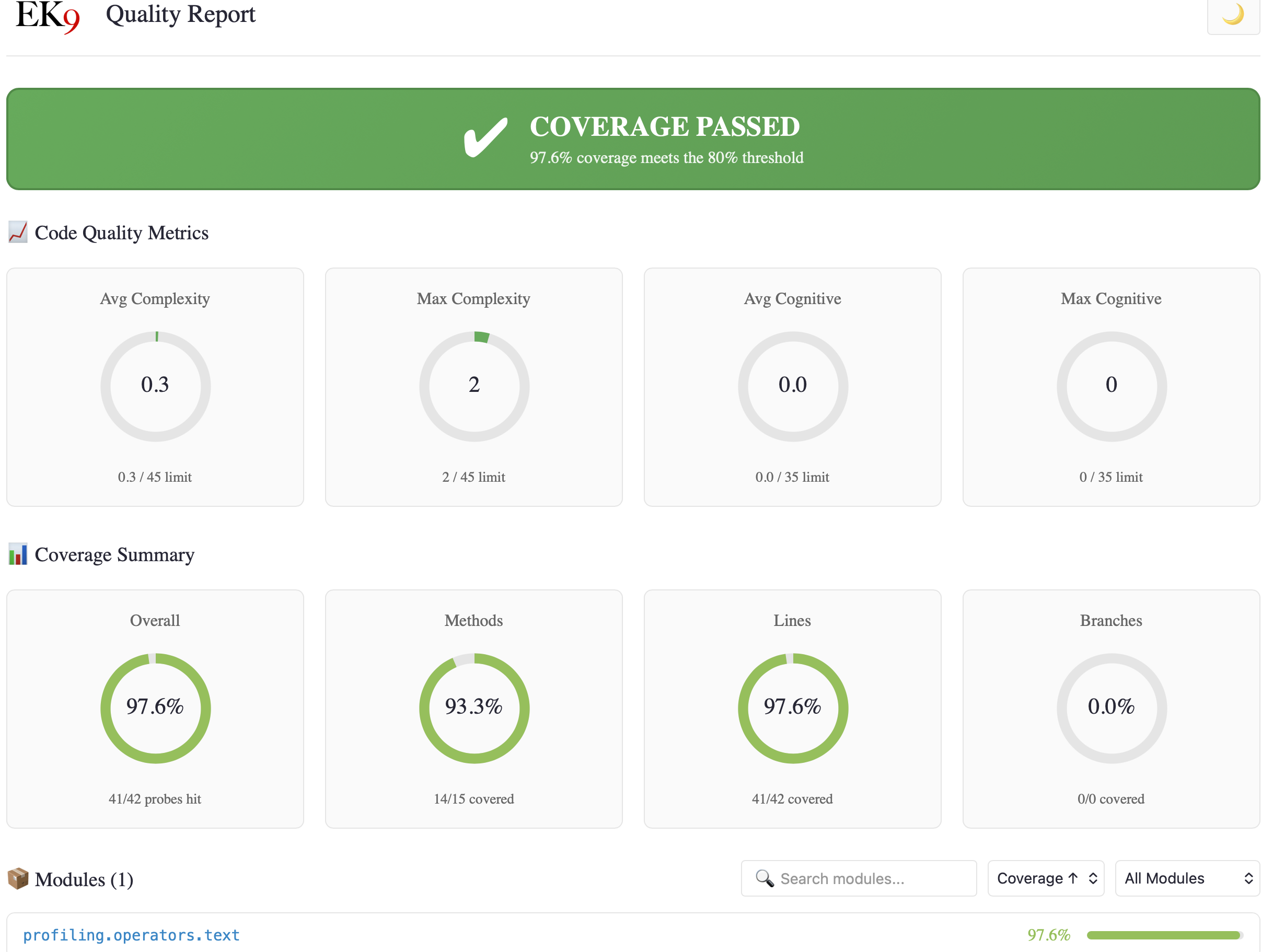
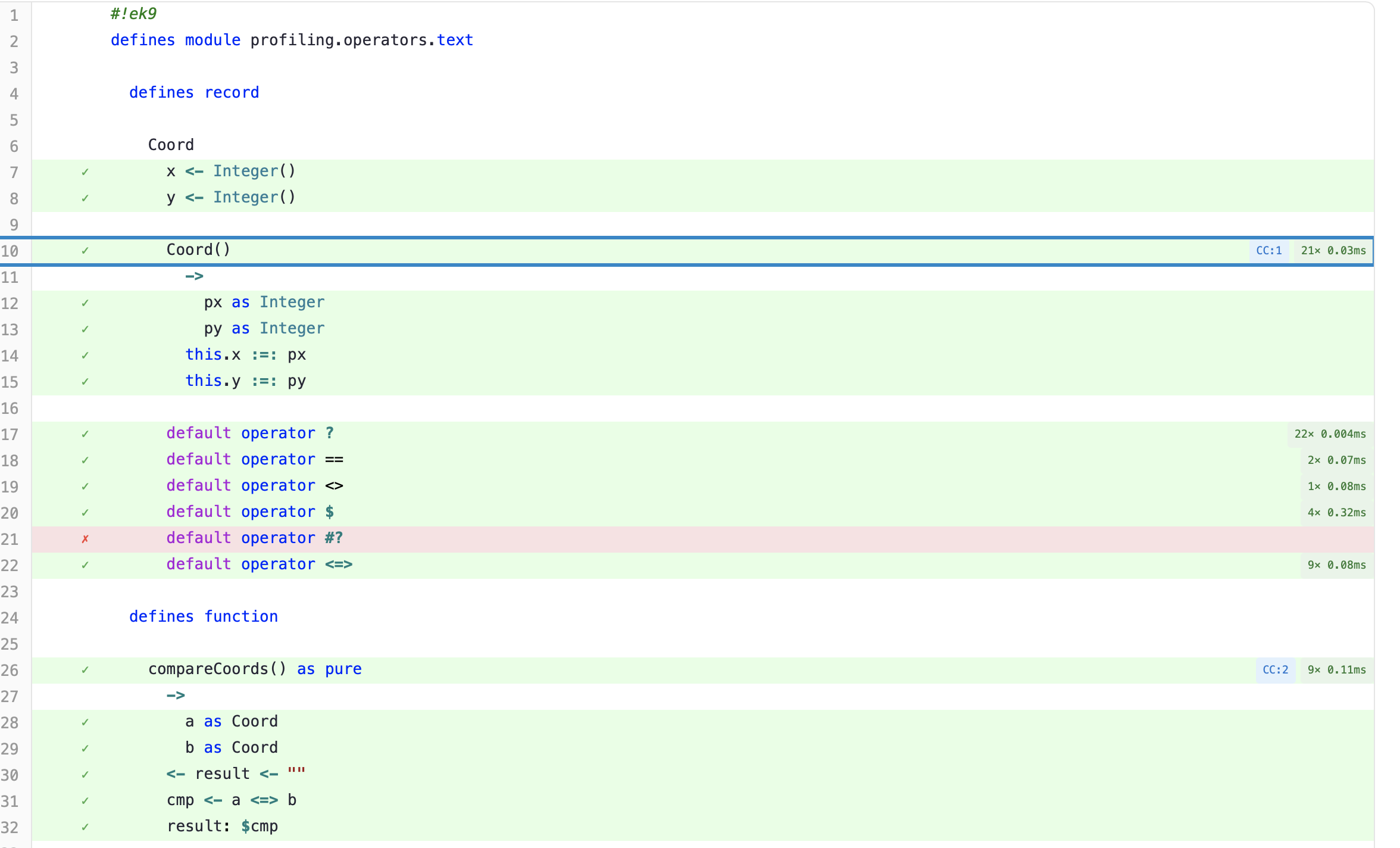
Source code views show line-by-line coverage, complexity badges, and profiling data per function:
Profiling includes flame graphs and a hot function table with percentile metrics:
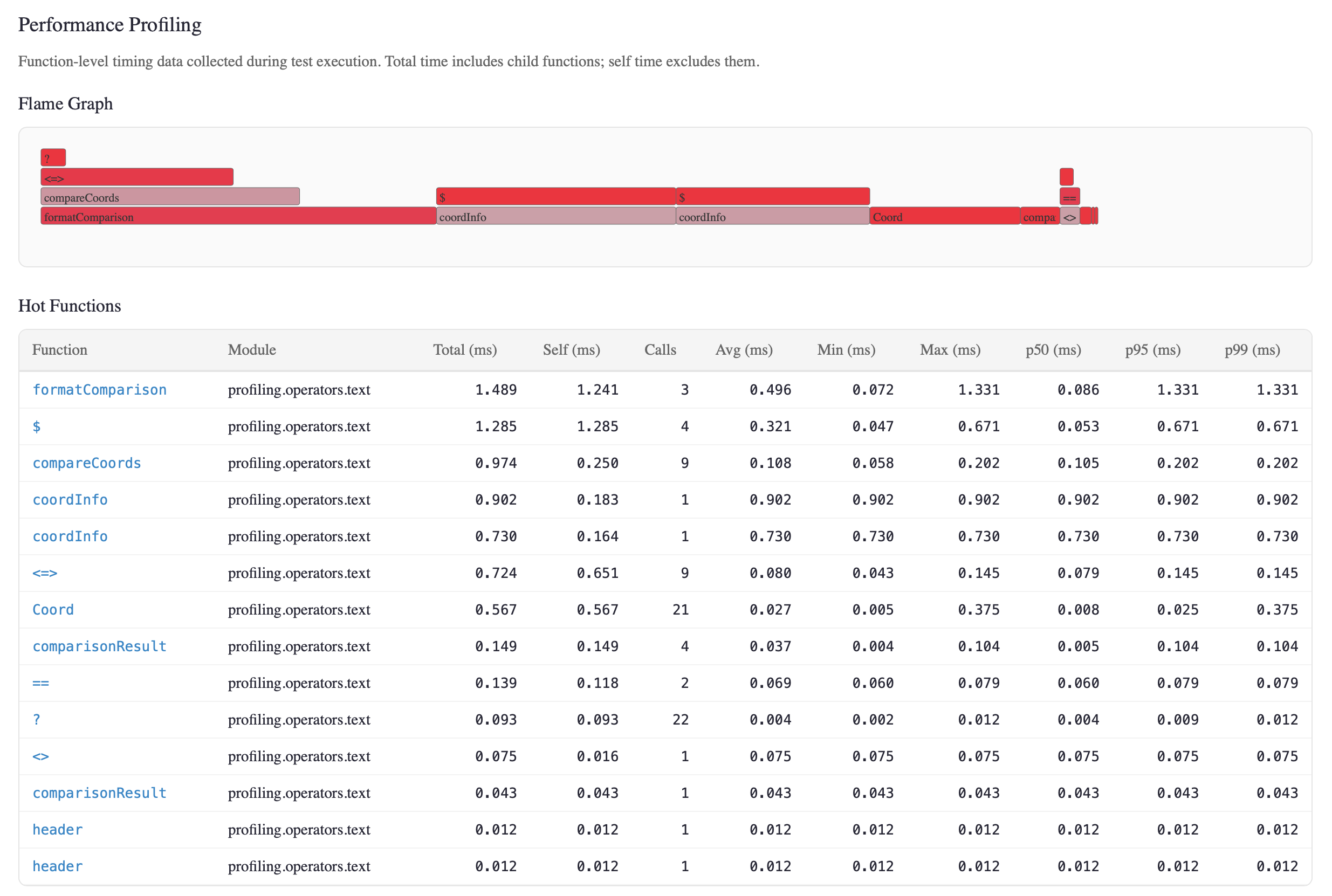
All of this from a single command. No external tools, no configuration. See Code Coverage and Profiling for details.
Tests Run Automatically
When you package (ek9 -P) or deploy (ek9 -D) your code,
tests are executed automatically. You don't need to remember to run them - EK9
won't package code with failing tests. Testing isn't a separate manual step; it's
woven into the development workflow.
Test Types
EK9 supports three complementary testing approaches:
- Assert-Based - Unit testing individual functions; call functions
and check results with
assert - Black-Box - Regression testing program output; compare stdout
to
expected_output.txt - Parameterized - Testing with multiple input sets; run same test with different input files
1. Assert-Based Tests
Use assert, assertThrows, and assertDoesNotThrow
for internal validation within test code.
Project Structure
simpleAssertTest/
├── main.ek9           # Production code (functions to test)
└── dev/
    └── tests.ek9      # Test programs with @Test directive
Production Code (main.ek9)
#!ek9
defines module simple.assert.test

  defines function

    add() as pure
      ->
        a as Integer
        b as Integer
      <- result as Integer: a + b

    multiply() as pure
      ->
        a as Integer
        b as Integer
      <- result as Integer: a * b

//EOF
Test Code (dev/tests.ek9)
#!ek9
defines module simple.assert.test.tests

  references
    simple.assert.test::add
    simple.assert.test::multiply

  defines program

    @Test
    AdditionTest()
      result <- add(2, 3)
      assert result?
      assert result == 5

    @Test
    MultiplicationTest()
      result <- multiply(4, 5)
      assert result?
      assert result == 20

    @Test
    CombinedOperationsTest()
      sum <- add(10, 20)
      product <- multiply(sum, 2)
      assert product == 60

//EOF
2. Black-Box Tests
Validate program output against expected files. For tests without command line
arguments, the file must be named exactly expected_output.txt in
the same directory as the test. Ideal for regression testing and AI-generated tests.
Project Structure
blackBoxTest/
├── main.ek9                # Production code
└── dev/
    ├── tests.ek9           # Test program
    └── expected_output.txt # Expected stdout output
Production Code (main.ek9)
#!ek9
defines module blackbox.test

  defines function

    greet() as pure
      -> name as String
      <- greeting as String: "Hello, " + name + "!"

//EOF
Test Code (dev/tests.ek9)
#!ek9
defines module blackbox.test.tests

  references
    blackbox.test::greet

  defines program

    @Test
    GreetingOutputTest()
      stdout <- Stdout()
      stdout.println(greet("World"))
      stdout.println(greet("EK9"))

//EOF
Expected Output (dev/expected_output.txt)
Hello, World!
Hello, EK9!
When Output Doesn't Match
If the actual output differs from expected, EK9 shows a line-by-line comparison:
[X] FAIL blackbox.test.tests::GreetingOutputTest [BlackBox] (3ms)
    Output mismatch at line 2:
      Expected: Hello, EK9!
      Actual:   Hello, EK9?
3. Parameterized Tests
Run the same test with multiple inputs using commandline_arg_{id}.txt
and expected_case_{id}.txt file pairs. Each file pair defines a test case.
Project Structure
parameterizedTest/
├── main.ek9                       # Production code
└── dev/
    ├── tests.ek9                  # Test program with parameters
    ├── commandline_arg_simple.txt # Case "simple": input arguments
    ├── expected_case_simple.txt   # Case "simple": expected output
    ├── commandline_arg_edge.txt   # Case "edge": input arguments
    └── expected_case_edge.txt     # Case "edge": expected output
Production Code (main.ek9)
#!ek9
defines module parameterized.test

  defines function

    processArg() as pure
      -> arg as String
      <- result as String: "Processed: " + arg

//EOF
Test Code (dev/tests.ek9)
#!ek9
defines module parameterized.test.tests

  references
    parameterized.test::processArg

  defines program

    @Test
    ArgProcessor()
      ->
        arg0 as String
        arg1 as String

      stdout <- Stdout()
      stdout.println(processArg(arg0))
      stdout.println(processArg(arg1))

//EOF
Test Case "simple"
commandline_arg_simple.txt:
hello
world
expected_case_simple.txt:
Processed: hello
Processed: world
Test Case "edge"
commandline_arg_edge.txt:
single
only
expected_case_edge.txt:
Processed: single
Processed: only
The @Test Directive
Mark programs as tests using the @Test directive. Only programs with
this directive are discovered and executed by the test runner.
Ungrouped vs Grouped Tests
By default, tests run in parallel for faster execution. Use groups when tests need sequential execution - typically for database tests, file system tests, or tests that share external resources where order matters.
Syntax: @Test: "groupname" - tests in the same group run sequentially,
while different groups run in parallel with each other.
Project Structure
groupedTests/
├── main.ek9        # Production code (Counter class)
└── dev/
    └── tests.ek9   # Test programs
Production Code (main.ek9)
#!ek9
defines module grouped.tests

  defines class

    Counter
      value as Integer: 0

      getValue() as pure
        <- rtn as Integer: value

      increment()
        value: value + 1

//EOF
Test Code (dev/tests.ek9)
#!ek9
defines module grouped.tests.tests

  references
    grouped.tests::Counter

  defines program

    @Test: "counter"
    CounterIncrementTest()
      c <- Counter()
      c.increment()
      assert c.getValue() == 1

    @Test: "counter"
    CounterMultipleIncrementTest()
      c <- Counter()
      c.increment()
      c.increment()
      c.increment()
      assert c.getValue() == 3

    @Test
    IndependentTest()
      c <- Counter()
      assert c.getValue() == 0

//EOF
CounterIncrementTest and CounterMultipleIncrementTest
are both in the "counter" group and run sequentially. IndependentTest has no
group and runs in parallel with other ungrouped tests.
Assertion Statements
Unlike traditional testing frameworks that require parsing stack traces, EK9's assertions provide structured, precise error information automatically captured from the AST. This includes the exact source location (file, line, column), the expression that failed, and contextual details - all without writing custom error messages.
assert
Validates that a condition is true:
@Test
CheckAddition()
  result <- 2 + 3
  assert result?          // Check result is set (not unset)
  assert result == 5      // Check result equals expected value
Failure Output
When an assertion fails, EK9 shows the exact expression and location:
Assertion failed: `result==5` at ./dev/tests.ek9:28:7
assertThrows
Validates that an expression throws a specific exception type:
@Test
CheckDivisionByZero()
  assertThrows(Exception, 10 / 0)

@Test
CheckAndInspectException()
  caught <- assertThrows(Exception, 10 / 0)
  assert caught.message()?
Failure Output - No Exception Thrown
If the expression doesn't throw:
assertThrows FAILED
  Location: ./dev/tests.ek9:5:3
  Expression: 10 / 2
  Expected: org.ek9.lang::Exception
  Actual: No exception was thrown
assertDoesNotThrow
Validates that an expression completes without throwing any exception:
@Test
CheckSafeDivision()
  assertDoesNotThrow(10 / 2)

@Test
CheckAndCaptureResult()
  result <- assertDoesNotThrow(10 / 2)
  assert result == 5
Failure Output
If the expression throws unexpectedly:
assertDoesNotThrow FAILED
  Location: ./dev/tests.ek9:5:3
  Expression: 10 / 0
  Expected: No exception
  Actual: org.ek9.lang::Exception
  Message: Division by zero
Why This Matters
Traditional testing frameworks like JUnit or pytest require you to either:
- Write custom assertion messages manually
- Parse stack traces to find the failure location
- Guess which assertion failed when there are multiple in a test
EK9's grammar-level assertions automatically capture the expression text, source location, and all relevant context at compile time. This is especially valuable for:
- AI/LLM integration - Structured output is easily parsed
- CI/CD pipelines - Precise locations enable automated issue creation
- Debugging - No stack trace parsing required
require vs assert
EK9 distinguishes between production preconditions and test assertions:
require- Production preconditions, checked in any code pathassert- Test validation, only valid in@Testprograms
Using assert in production code paths produces compile-time error
E81012. Both test and production code must meet
EK9's quality standards - quality enforcement is comprehensive
and applies everywhere.
The require Statement
The require statement validates preconditions in production code. When a
require condition is false, it throws an uncatchable Exception that
terminates execution immediately. See Error Handling Strategy
for how require fits into EK9's overall error handling approach alongside
throw/try-catch, Result, and Optional.
Panic-like Behavior: Unlike normal exceptions, require failures
cannot be caught. There is no recovery mechanism. This is similar to panic
in Go or Rust. When require fails, you have a serious, unrecoverable defect
in your program.
Why Uncatchable?
This design is intentional. EK9 prevents control flow from being driven by
require failures:
- No exception-based control flow - You cannot use
try/catchto handlerequirefailures and continue execution - Fail-fast semantics - Precondition violations indicate programming errors, not recoverable runtime conditions
- Clear contract enforcement - If a
requirefails, the caller violated the contract - this is a bug, not a handleable situation
When to Use require
#!ek9
defines module order.processing

  defines class

    Order
      items as List of OrderItem: List()
      status as OrderStatus: OrderStatus.Created

      //Constructor with preconditions
      Order()
        ->
          customerId as String
          initialItems as List of OrderItem
        //Preconditions - if these fail, caller has a bug
        require customerId?
        require initialItems?
        require not initialItems.empty()
        ...

      //Method with preconditions
      addItem()
        -> item as OrderItem
        require item?
        require status == OrderStatus.Created
        items += item

      //Method ensuring invariants
      submit()
        require not items.empty()
        require status == OrderStatus.Created
        status: OrderStatus.Submitted

//EOF
require vs Validation
require is for programming errors, not user input validation:
Use require |
Use Validation (catchable) |
|---|---|
| Null/unset parameter when null not allowed | User entered invalid email format |
| Collection empty when must have items | User entered age outside valid range |
| Method called in wrong object state | File not found (recoverable error) |
| Internal invariant violated | Network timeout (can retry) |
If the condition could reasonably fail due to user input or external factors, use
normal validation with catchable exceptions. If the condition failing means the
programmer made a mistake, use require.
Comparison with Other Languages
| Language | Equivalent | Behavior |
|---|---|---|
| EK9 | require |
Uncatchable exception, immediate termination |
| Go | panic |
Uncatchable (unless recover used) |
| Rust | panic! |
Unwinds stack, terminates thread |
| Java | assert |
Can be disabled at runtime (weak) |
| C/C++ | assert() |
Can be compiled out with NDEBUG (weak) |
EK9's require is stronger than Java/C assertions because it cannot be
disabled. Preconditions are always checked in production code.
Test Runner
Run tests using the -t flag:
ek9 -t myproject.ek9        # Run tests (human output)
ek9 -t0 myproject.ek9       # Terse output
ek9 -t2 myproject.ek9       # JSON output (for CI/AI)
ek9 -t3 myproject.ek9       # JUnit XML output
ek9 -t4 myproject.ek9       # Verbose coverage (human)
ek9 -t5 myproject.ek9       # Verbose coverage + JSON file
ek9 -t6 myproject.ek9       # Interactive HTML report
ek9 -tL myproject.ek9       # List tests without running
ek9 -tg database myproject.ek9  # Run only "database" group

# With profiling (append 'p' to any format):
ek9 -tp myproject.ek9       # Human output + profiling
ek9 -t2p myproject.ek9      # JSON output + profiling data
ek9 -t5p myproject.ek9      # Verbose coverage + profiling
ek9 -t6p myproject.ek9      # Full HTML report with flame graph
Exit codes: The test runner returns:
- Exit code
0- All tests passed and coverage meets threshold - Exit code
11- One or more tests failed their assertions - Exit code
12- All tests passed but code coverage is below 80%
This enables CI/CD pipelines to detect both test failures and insufficient coverage automatically. See Command Line for all exit codes and E83001 for coverage threshold error details.
Output Formats
EK9 provides multiple output formats optimized for different use cases:
Human Format (-t or -t1)
Visual output with icons for terminal use:
[i] Found 4 tests:
  4 assert (unit tests with assertions)

Executing 4 tests...

[OK] PASS myapp.tests::AdditionWorks [Assert] (3ms)
[X] FAIL myapp.tests::DivisionFails [Assert] (2ms)
    Assertion failed: `result==5` at ./dev/tests.ek9:28:7
[X] FAIL myapp.tests::AnotherFailure [Assert] (1ms)
    Assertion failed: `1==2` at ./dev/tests.ek9:33:7
[OK] PASS myapp.tests::MultiplicationWorks [Assert] (2ms)

Summary: 2 passed, 2 failed (4 total)
Types: 4 assert
Duration: 8ms
Grouped tests show their group name:
[OK] PASS myapp.tests::CounterTest [Assert] {counter} (2ms)
Terse Format (-t0)
Minimal output for scripting and CI pass/fail checks:
4 tests: 2 passed, 2 failed (4 assert)
JSON Format (-t2)
Structured output for AI/LLM integration and custom tooling:
{
  "version": "1.0",
  "timestamp": "2025-12-31T14:30:00+00:00",
  "architecture": "JVM",
  "summary": {
    "total": 4,
    "passed": 2,
    "failed": 2,
    "types": { "assert": 4 }
  },
  "tests": [
    {
      "name": "AdditionWorks",
      "fqn": "myapp.tests::AdditionWorks",
      "status": "passed",
      "duration_ms": 3
    },
    {
      "name": "DivisionFails",
      "fqn": "myapp.tests::DivisionFails",
      "status": "failed",
      "failure": {
        "type": "assertion",
        "message": "Assertion failed: `result==5` at ./dev/tests.ek9:28:7"
      }
    }
  ]
}
JUnit XML Format (-t3)
Standard format for CI/CD systems (Jenkins, GitHub Actions, GitLab):
<?xml version="1.0" encoding="UTF-8"?>
<testsuite name="myapp.tests" tests="4" failures="2" errors="0" time="0.008">
  <testcase name="AdditionWorks" classname="myapp.tests" time="0.003"/>
  <testcase name="DivisionFails" classname="myapp.tests" time="0.002">
    <failure message="Assertion failed" type="AssertionError">
Assertion failed: `result==5` at ./dev/tests.ek9:28:7
    </failure>
  </testcase>
  <testcase name="AnotherFailure" classname="myapp.tests" time="0.001">
    <failure message="Assertion failed" type="AssertionError">
Assertion failed: `1==2` at ./dev/tests.ek9:33:7
    </failure>
  </testcase>
  <testcase name="MultiplicationWorks" classname="myapp.tests" time="0.002"/>
</testsuite>
Code Coverage
EK9 automatically collects code coverage data during test execution. Coverage is always enforced - if your code falls below the 80% threshold, the test runner returns exit code 12.
See Code Coverage for threshold enforcement details, output formats (JSON, JaCoCo XML, HTML), quality metrics (complexity, readability), and interactive HTML reports with source views.
Performance Profiling
EK9 includes built-in performance profiling. Append p to any test
format flag (e.g., -t6p) to collect call counts, timing, and percentile
metrics alongside test results and coverage.
See Profiling for flame graph interpretation, the hot function table column guide, and per-function profiling badges.
Output Placeholders
Black-box tests often produce dynamic values like dates, timestamps, or IDs that change between runs. Use type-based placeholders in expected output files to match these values. Placeholder names match EK9 type names - if you know EK9 types, you know the placeholders.
Example: Testing a Report Generator
main.ek9
#!ek9
defines module report.generator

  defines function

    generateReport() as pure
      -> itemCount as Integer
      <- report as String: `Report generated on ` + $Date() + ` with ` + $itemCount + ` items`

//EOF
dev/tests.ek9
#!ek9
defines module report.generator.tests

  references
    report.generator::generateReport

  defines program

    @Test
    ReportIncludesDate()
      stdout <- Stdout()
      stdout.println(generateReport(42))

//EOF
dev/expected_output.txt
Report generated on {{Date}} with {{Integer}} items
The test passes regardless of which date or item count is used, because
{{Date}} matches any valid date (e.g., 2025-12-31) and
{{Integer}} matches any integer.
Available Placeholders
| Placeholder | Matches | Example |
|---|---|---|
{{String}} | Any non-empty text | hello world |
{{Integer}} | Whole numbers | 42, -17 |
{{Float}} | Decimal numbers | 3.14, -2.5 |
{{Boolean}} | true or false | true |
{{Date}} | ISO date | 2025-12-31 |
{{Time}} | Time of day | 14:30:45 |
{{DateTime}} | ISO datetime with timezone | 2025-12-31T14:30:45+00:00 |
{{Duration}} | ISO duration | PT1H30M, P1Y2M3D |
{{Millisecond}} | Milliseconds | 5000ms |
{{Money}} | Currency amount | 10.50#USD |
{{Colour}} | Hex colour | #FF5733 |
{{Dimension}} | Measurement with unit | 10.5px, 100mm |
{{GUID}} | UUID format | 550e8400-e29b-41d4-... |
{{FileSystemPath}} | File/directory path | /path/to/file.txt, C:\dir\file |
See E81010 for the complete list of 18 valid placeholders. Using an invalid placeholder name produces a compile-time error.
Compile-Time Validation
EK9 validates test code at compile time using two complementary systems: test-specific validation and comprehensive quality enforcement.
Test-Specific Validation
EK9's call graph analysis detects testing issues at compile time:
- E81007 - Empty @Test (no assertions, no expected files)
- E81011 - Orphan assertion (not reachable from any @Test)
- E81012 - Production assertion (assert in non-test code path)
Quality Enforcement on Test Code
Critical: ALL quality enforcement applies to test code, not just production code. Your tests must meet the same standards:
Naming Quality (E11026, E11030, E11031)
- E11026: Reference Ordering - References in test modules must be alphabetically ordered
- E11030: Similar Names - Test variable names cannot be confusingly similar (Levenshtein distance ≤2, same type)
- E11031: Non-Descriptive Names - Test variables cannot use generic names (temp, flag, data, value, buffer, object)
Complexity Limits (E11010-E11013)
- E11010: Cyclomatic Complexity - Test functions must stay below complexity 11
- E11011: Nesting Depth - Test nesting depth cannot exceed 4
- E11012: Statement Count - Expression complexity enforced
- E11013: Expression Complexity - Complex expressions must be broken down
Cohesion and Coupling (E11014-E11016)
- E11014: Low Cohesion - Test classes must maintain cohesion (LCOM4 metric)
- E11015: Efferent Coupling - Test modules must respect outgoing coupling limits
- E11016: Module Coupling - Test modules must respect overall coupling limits
Why this matters: Tests are code. Poorly structured tests with confusing names and high complexity are as problematic as production code with those issues. EK9 ensures tests remain readable and maintainable.
Example: Quality Violation in Test Code
#!ek9
defines module my.tests

  defines program

    @Test
    MyTest()
      temp <- fetchUser()        // ❌ E11031: Non-descriptive name 'temp'
      data <- processUser(temp)  // ❌ E11031: Non-descriptive name 'data'
      assert data?
This test won't compile. Fix the naming violations first:
#!ek9
defines module my.tests

  defines program

    @Test
    MyTest()
      user <- fetchUser()              // ✓ Descriptive name
      processedUser <- processUser(user)  // ✓ Descriptive name
      assert processedUser?
If your test code violates quality gates, the tests won't run. Fix quality issues first, then run tests. See Code Quality for complete documentation of all enforcement rules and Error Index for detailed error explanations.
Test Directory Structure
Test files live in the dev/ directory, which is only included when
running tests (-t flag).
myproject/
├── main.ek9                    # Production code
└── dev/                        # Test source directory
    ├── unitTests.ek9           # Assert-based tests
    ├── greetingTest/           # Black-box test (one per directory)
    │   ├── test.ek9
    │   └── expected_output.txt
    └── calculatorTest/         # Parameterized test
        ├── test.ek9
        ├── commandline_arg_basic.txt
        ├── expected_case_basic.txt
        ├── commandline_arg_edge.txt
        └── expected_case_edge.txt
Test Configuration Errors
See the Error Index for complete documentation of test configuration errors (E81xxx), test execution errors (E82xxx), and coverage threshold errors (E83xxx).
See Also
- Exception Handling -
throw,try/catch/finally, dispatcher pattern, try-with-resources - Error Handling Strategy - Decision guide:
requirevsthrowvs Result vsassert - Code Coverage - Threshold enforcement, quality metrics, HTML reports
- Profiling - Flame graphs, hot function table, percentile metrics
- Test Generation - Automated edge-case test generation and mutation testing
- Code Quality - Quality enforcement rules and thresholds
- Command Line - All flags and exit codes
- Error Index - E81xxx (test config), E82xxx (execution), E83xxx (coverage)
- For AI Assistants - Machine-readable output schemas
Quick Reference
| Task | Command / Syntax |
|---|---|
| Run all tests | ek9 -t main.ek9 |
| Run with JSON output | ek9 -t2 main.ek9 |
| Run with JUnit XML | ek9 -t3 main.ek9 |
| List tests only | ek9 -tL main.ek9 |
| Run specific group | ek9 -tg groupname main.ek9 |
| Coverage details | See Code Coverage (-t4, -t5, -t6, -tC) |
| Profiling | See Profiling (append p to any format, e.g. -t6p) |
| Mark as test | @Test before program |
| Mark as grouped test | @Test: "groupname" |
| Assert condition | assert condition |
| Assert throws | assertThrows(ExceptionType, expr) |
| Assert no throw | assertDoesNotThrow(expr) |
| Precondition (uncatchable) | require condition |
| Black-box expected file | dev/expected_output.txt |
| Parameterized args | dev/commandline_arg_{id}.txt |
| Parameterized expected | dev/expected_case_{id}.txt |